Technical improvements in our new look indexes have enabled us to significantly decrease the size of our pages - making them quicker to download. However, these changes have made it a little bit harder to resize fonts to your requirements.
Users of Microsoft Internet Explorer who wish to change font size on the BBC News site will need to turn on the browsers' accessibility font resizing function (Users of most other recent browsers should not be affected).
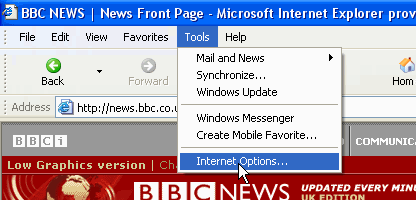
Step 1: Select "Internet Options" from the "Tools" menu.
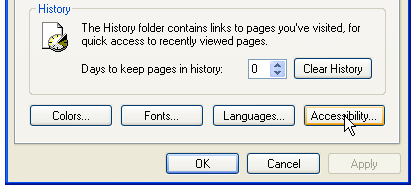
Step 2: Open the "Accessibility" window.
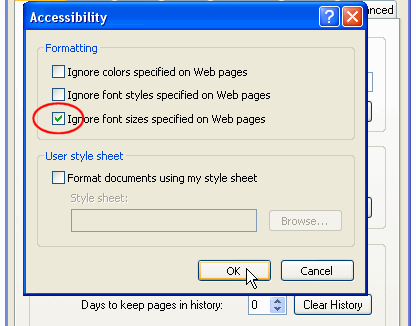
Step 3: Select "Ignore font sizes specified on Web pages".
Step 4: Press OK to confirm the changes.
 Home
Home


 BBC NEWS CHANNEL
 News services
 Email this to a friend
  Printable version